Friday, August 26, 2005
More on phone wiring
Or should that be Moron phone wiring :-)
After the success with taking the ring wire off and improving the SNR I was blessed with a free speed upgrade to 2M by my ISP Demon which was facilitated by ADSLguide getting my entry changed in BT's line prequalification number checker.
This speed upgrade took the downstream SNR margin down to 25 dB, still healthy but I was pleased I did the ring wire thing to improve it. Last night I hooked the ring wire up again and the ADSL modem lost sync, it re-trained to an SNR of 12 dB and ran OK but clocked up errors. The reason I put it back on was to look at the frequency effects of the interference, using a Sagem F@st 800 modem's diagnostic mode.

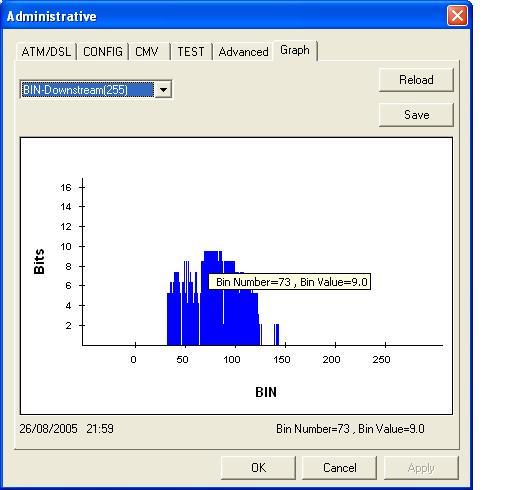
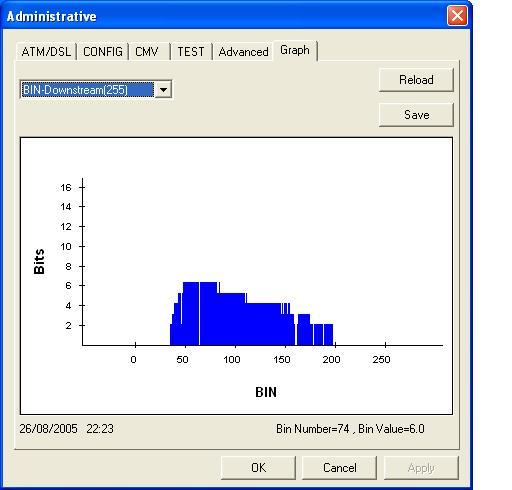
The first plot is with the ring wire disconnected, showing a wide range of useable frequencies. The second plot shows the effect of reconnecting the ring wire - it loses virtually everything above frequency band 140 with a consequent loss of ADSL data carrying capacity. The lower frequencies are a lot more ragged too. It would still operate at 2Mbits/s but was clearly less capable than before.

With the higher frequencies rendered unuseable by the ring wire interference, the modem is forced to cram more data into the lower frequency bands. This in turn makes it more sensitive to interference as a higher SNR is required in order to use more bits per channel.
So at least we can see why the ring wire impacts upon the SNR, it is adding interference in the 600 kHz - 1 MHz range. This is AM radio territory, so perhaps this should not be a suprise - for all I know the ring wire may be a nice wideband AM radio antenna, built into my house :-)
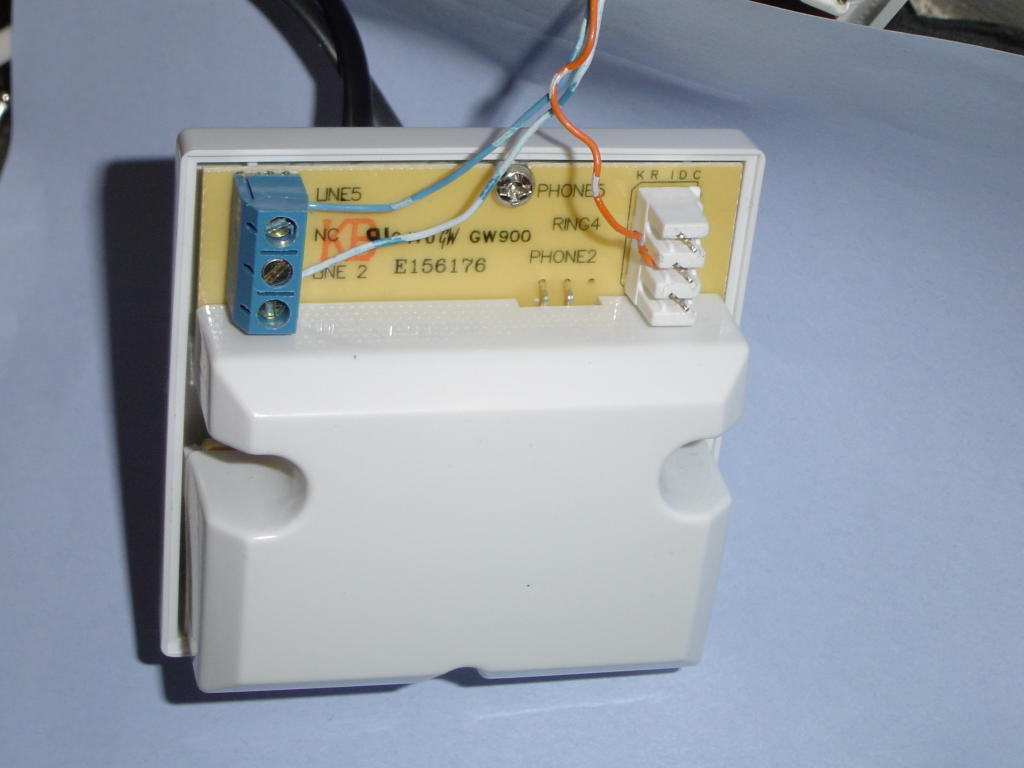
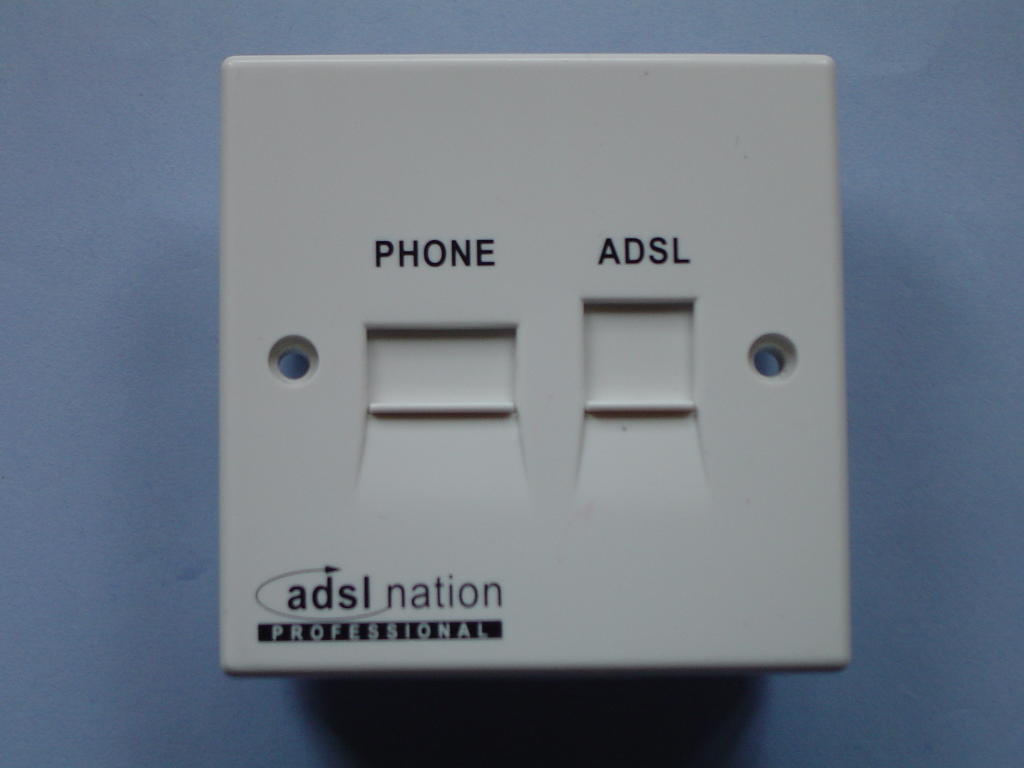
For my final experiment I hooked up a filtered socket from ADSL Nation in place of the master. This provides a filtered and unfiltered socket on the front, and an IDC terminal block for filtered extensions on the back. So I used it to provide me with a filtered ring wire that could supply ringing voltage to all the extensions without compromising the ADSL. This works well and maintained the 25 dB SNR and over 10 hours my router only clocked 3 CRC errors.
LocalSNRMargin = 25.0 dB
LocalLineAttn = 32.5 dB
LocalTxPower = 10.5 dB
LocalFastChannelRxRate = 2272000
LocalFastChannelTxRate = 288000
LocalFastChannelFEC = 0
LocalFastChannelCRC = 3
LocalFastChannelHEC = 0
RemoteLineAttn = 22.0 dB
RemoteSNRMargin = 29 dB
The only point in doing the filtered ringwire bit, as opposed to simply disconnecting the ring wire, is to leave the extension wiring fully functional, such that if you aren't using ADSL any more or leave the property the phone sockets will behave as expected. One wonders if at some point BT will abandon the ring (3rd) wire, it may have made sense 20 years ago for electromechanical bells but its a real nuisance with ADSL broadband.
The images below show the "before" bin plot with the original ringwire connected, the filtered ringwire connection and the "after" bin plot using the filtered ringwire.


After the success with taking the ring wire off and improving the SNR I was blessed with a free speed upgrade to 2M by my ISP Demon which was facilitated by ADSLguide getting my entry changed in BT's line prequalification number checker.
This speed upgrade took the downstream SNR margin down to 25 dB, still healthy but I was pleased I did the ring wire thing to improve it. Last night I hooked the ring wire up again and the ADSL modem lost sync, it re-trained to an SNR of 12 dB and ran OK but clocked up errors. The reason I put it back on was to look at the frequency effects of the interference, using a Sagem F@st 800 modem's diagnostic mode.

The first plot is with the ring wire disconnected, showing a wide range of useable frequencies. The second plot shows the effect of reconnecting the ring wire - it loses virtually everything above frequency band 140 with a consequent loss of ADSL data carrying capacity. The lower frequencies are a lot more ragged too. It would still operate at 2Mbits/s but was clearly less capable than before.

With the higher frequencies rendered unuseable by the ring wire interference, the modem is forced to cram more data into the lower frequency bands. This in turn makes it more sensitive to interference as a higher SNR is required in order to use more bits per channel.
So at least we can see why the ring wire impacts upon the SNR, it is adding interference in the 600 kHz - 1 MHz range. This is AM radio territory, so perhaps this should not be a suprise - for all I know the ring wire may be a nice wideband AM radio antenna, built into my house :-)
For my final experiment I hooked up a filtered socket from ADSL Nation in place of the master. This provides a filtered and unfiltered socket on the front, and an IDC terminal block for filtered extensions on the back. So I used it to provide me with a filtered ring wire that could supply ringing voltage to all the extensions without compromising the ADSL. This works well and maintained the 25 dB SNR and over 10 hours my router only clocked 3 CRC errors.
LocalSNRMargin = 25.0 dB
LocalLineAttn = 32.5 dB
LocalTxPower = 10.5 dB
LocalFastChannelRxRate = 2272000
LocalFastChannelTxRate = 288000
LocalFastChannelFEC = 0
LocalFastChannelCRC = 3
LocalFastChannelHEC = 0
RemoteLineAttn = 22.0 dB
RemoteSNRMargin = 29 dB
The only point in doing the filtered ringwire bit, as opposed to simply disconnecting the ring wire, is to leave the extension wiring fully functional, such that if you aren't using ADSL any more or leave the property the phone sockets will behave as expected. One wonders if at some point BT will abandon the ring (3rd) wire, it may have made sense 20 years ago for electromechanical bells but its a real nuisance with ADSL broadband.
The images below show the "before" bin plot with the original ringwire connected, the filtered ringwire connection and the "after" bin plot using the filtered ringwire.
Finally, just a reminder that the above refers to star or spur wired systems where an NTE5 master socket can't be fitted. The NTE5 filtered faceplate is the preferred solution where it can be used, it incorporates filtered extension wiring and, if needed, an unfiltered extension connection for a modem distant from the NTE5 linebox / master socket. Having said that, one ADSLguide user has reported improved SNR through removing the ring wire from his filtered faceplate - so if you are trying to squeeze the last few kbits/s of speed or are trying to make a dead or unreliable line work it may be worth a try.


Sunday, August 14, 2005
ADSL tweaking.
Most broadband in the UK is ADSL supplied over phone lines. This involves a cunning plan to send frequencies of 100 kHz up to 1 MHz (AM through Short Wave radio) along the line superimposed on the low frequency voice signal. This allows speeds of several MBits/s to be transmitted over twisted pair copper cables only ever intended for analogue voice, quite neat really.
Nowadays ADSL is supplied "wires only" ie BT put the signal on the line and the user gets to make it work. When the twisted pair phone wire arrives in the user's house it is converted by a "master socket" to a 3-wire system where the 3rd wire provides a ring circuit, originally designed to power clunky bells in old steam phones, see this explanation. This 3rd wire is a "bit of an issue" as it makes the nicely symmetrical balanced twisted pair into the equivalent of a 3-legged ballerina.
In my case, the ring wire runs around my house as part of the feed to at least 6 extension phone points, in doing so it acts as a nice big aerial (antenna) to collect any radio transmissions and random electrical noise that may be passing through. It then feeds this mush back into one side of the twisted pair through the capacitor that is there to provide the ring signal and consequently degrades the ADSL signal.
This "degradation" appears as a reduction in the signal to noise ratio (SNR) and as CRC errors counted up by the modem and in some cases causes disconnections or prevents the end user getting the speed their line should be capable of. As we move to faster speeds and to "rate adaption" where the ADSL goes as fast as the line allows it, the dear old ring wire will slow down our connections.
So, what to do with the 3rd wire. The Rolls Royce solution comes in the form of a filtered faceplate (photo on right) which fits onto modern BT NTE5 lineboxes and provides ADSL and voice on separate sockets with filtered extension wiring connectors at the back. This keeps mush from the extension wiring, including the ring wire, out of the ADSL signal. It also avoids needing to use microfilters on each telephone appliance, which is A Good Thing™. Also available from ADSLnation.com
However, many of us don't have a nice NTE5 terminating our incoming phone line.
My phone line comes into a junction box in the roofspace from which the wires run in a "star" or spur configuration, the "master" socket is on one leg of the spur system and is identified by having a ring capacitor and a surge arrestor fitted.
As I have no NTE5 I can't use a filtered faceplate without a re-wire, so a bit of innovation is called for.
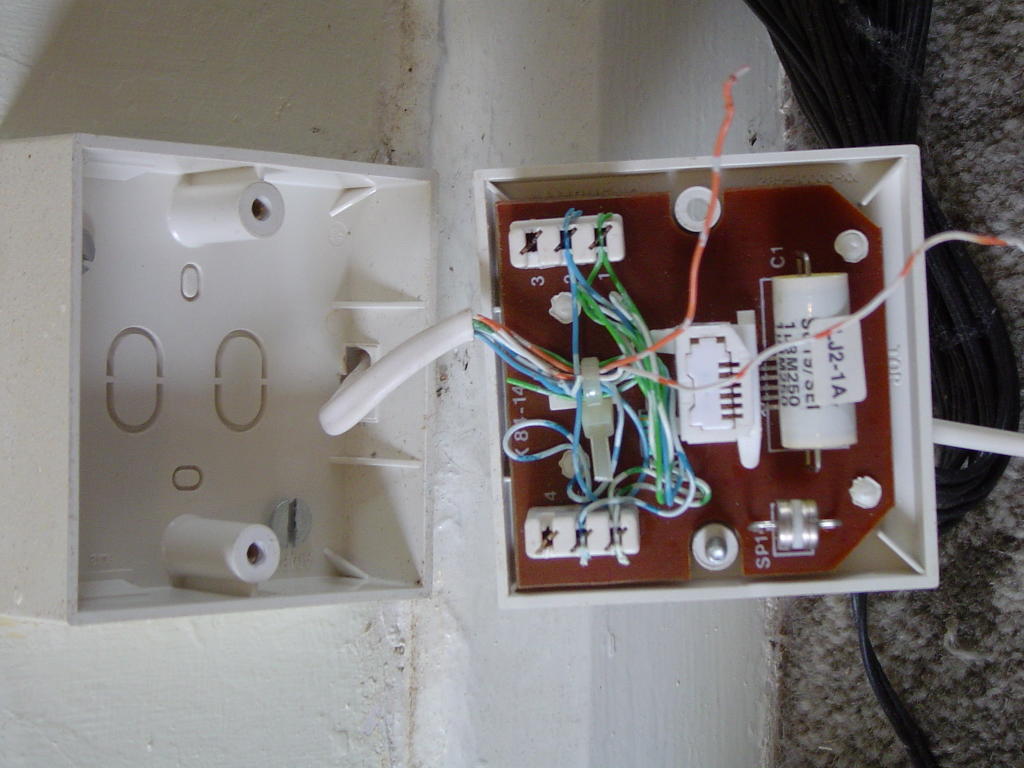
The photo on the right shows the back of my master socket with the ring wire disconnected from terminal 3, the other half of the orange/white pair is also disconnected from terminal 4. A higher resolution photo is at the bottom of this article.
By disconnecting the ring wire from the master we remove the 3rd leg and restore the balance / symmetry to the line.
Well, so much for the theory, what difference does disconnecting the ring wire actually make ? The stats from my router below show the results :-
Before, with ring wire (1 hour stats)
LocalSNRMargin = 20.5 dB
LocalLineAttn = 32.5 dB
RemoteLineAttn = 23.5 dB
RemoteSNRMargin = 25 dB
LocalFastChannelCRC = 22
LocalFastChannelHEC = 6
After, ring wire disconnected (20 hours)
LocalSNRMargin = 32.0 dB
LocalLineAttn = 32.5 dB
RemoteLineAttn = 23.5 dB
RemoteSNRMargin = 29 dB
LocalFastChannelCRC = 2
LocalFastChannelHEC = 0
So we see an increase in local SNR margin of 11.5 dB, meaning the router sees 11.5 dB more of the useable signal from the exchange after subtracting the noise. Going the other way the exchange gets to see 4 dB more of useable signal from the router. These figures after rebooting the router so it could adapt to the new line conditions.
20 hours after disconecting the error counter hadn't shifted from its initial value of 2 errors, compared to 28 CRC & HEC errors in just one hour with it connected. Result !!!
The phones still ring because they are using micro-filters and each of these has its own ring capacitor on the phone outlet side of the filter. If you disconnect the ring wire it would be prudent to re-connect it if you move out of the property, so the next occupier's phones work as expected.
Enjoy !

Nowadays ADSL is supplied "wires only" ie BT put the signal on the line and the user gets to make it work. When the twisted pair phone wire arrives in the user's house it is converted by a "master socket" to a 3-wire system where the 3rd wire provides a ring circuit, originally designed to power clunky bells in old steam phones, see this explanation. This 3rd wire is a "bit of an issue" as it makes the nicely symmetrical balanced twisted pair into the equivalent of a 3-legged ballerina.
In my case, the ring wire runs around my house as part of the feed to at least 6 extension phone points, in doing so it acts as a nice big aerial (antenna) to collect any radio transmissions and random electrical noise that may be passing through. It then feeds this mush back into one side of the twisted pair through the capacitor that is there to provide the ring signal and consequently degrades the ADSL signal.
This "degradation" appears as a reduction in the signal to noise ratio (SNR) and as CRC errors counted up by the modem and in some cases causes disconnections or prevents the end user getting the speed their line should be capable of. As we move to faster speeds and to "rate adaption" where the ADSL goes as fast as the line allows it, the dear old ring wire will slow down our connections.
So, what to do with the 3rd wire. The Rolls Royce solution comes in the form of a filtered faceplate
(photo on right) which fits onto modern BT NTE5 lineboxes and provides ADSL and voice on separate sockets with filtered extension wiring connectors at the back. This keeps mush from the extension wiring, including the ring wire, out of the ADSL signal. It also avoids needing to use microfilters on each telephone appliance, which is A Good Thing™. Also available from ADSLnation.comHowever, many of us don't have a nice NTE5 terminating our incoming phone line.
My phone line comes into a junction box in the roofspace from which the wires run in a "star" or spur configuration, the "master" socket is on one leg of the spur system and is identified by having a ring capacitor and a surge arrestor fitted.
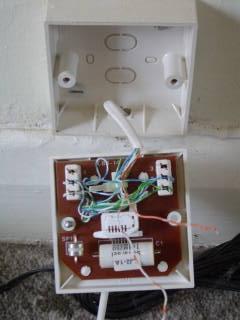
As I have no NTE5 I can't use a filtered faceplate without a re-wire, so a bit of innovation is called for.
The photo on the right shows the back of my master socket with the ring wire disconnected from terminal 3, the other half of the orange/white pair is also disconnected from terminal 4. A higher resolution photo is at the bottom of this article.
By disconnecting the ring wire from the master we remove the 3rd leg and restore the balance / symmetry to the line.
Well, so much for the theory, what difference does disconnecting the ring wire actually make ? The stats from my router below show the results :-
Before, with ring wire (1 hour stats)
LocalSNRMargin = 20.5 dB
LocalLineAttn = 32.5 dB
RemoteLineAttn = 23.5 dB
RemoteSNRMargin = 25 dB
LocalFastChannelCRC = 22
LocalFastChannelHEC = 6
After, ring wire disconnected (20 hours)
LocalSNRMargin = 32.0 dB
LocalLineAttn = 32.5 dB
RemoteLineAttn = 23.5 dB
RemoteSNRMargin = 29 dB
LocalFastChannelCRC = 2
LocalFastChannelHEC = 0
So we see an increase in local SNR margin of 11.5 dB, meaning the router sees 11.5 dB more of the useable signal from the exchange after subtracting the noise. Going the other way the exchange gets to see 4 dB more of useable signal from the router. These figures after rebooting the router so it could adapt to the new line conditions.
20 hours after disconecting the error counter hadn't shifted from its initial value of 2 errors, compared to 28 CRC & HEC errors in just one hour with it connected. Result !!!
The phones still ring because they are using micro-filters and each of these has its own ring capacitor on the phone outlet side of the filter. If you disconnect the ring wire it would be prudent to re-connect it if you move out of the property, so the next occupier's phones work as expected.
Enjoy !
Monday, July 11, 2005
VoIP USA
I took the covered wagon from Minneapolis up to Fargo, North Dakota (it was a DC9 actually, a bit late and very hot as it was 90 °F and sunny).
After visiting Walmart - 8pm on a Sunday - BestBuy, OfficeMax, OfficeDepot and finally Radio Shack (Tandy as was in the UK) I accumulated enough bits of wire to power and connect my BT Broadband Voice box (Cisco ATA186). I am connecting the laptop wirelessly to the hotel hi-speed internet and a crossover ethernet cable connects to the ATA186. The laptop is on an external IP address and the ATA gets a 192.168.0.x address from the laptop. I took a photo but seem to need yet another bit of wire to get it onto the laptop - there is no GPRS signal for the Treo600 to email me the photo it took. Watch this space. Picture here shows laptop on left connected by crossover cable to ATA in centre with hotel phone on right. Can't get the in-line image upload to work :(
The system works a treat, I accidentally called someone in the UK at 03:30 (woops) but then saved an arm and a leg by collecting my mobile voicemail at BT's offpeak Orange rate of 11.4p/minute rather than making a roaming Orange call at £1/min or whatever.
This was my first "hotspot" experiment - how to hook a dumb ATA up to a service that requires authentication via a web page. The laptop handled the authentication and hid the ATA from the hotspot - but how would you do this with an 802.11b SIP phone ??
I phoned across town via the UK to my friend in Fargo who has cable internet and a Vonage VoIP service (2 lines) with no analogue phoneline. There was a marginal delay but not the sort that makes conversation difficult. His ATA is the Linksys PAP2 but locked down to the Vonage service.
In Best Buy there were several routers or ATAs on offer with bundled VoIP service. Generally you get a mail-in rebate or account credit equal to the hardware cost when you sign up for the service. The kit included ATAs and routers with VoIP phone ports in both wired and wireless flavours.
Clearly the market focus is on getting cable internet users (the vast majority) to use VoIP in preference to analogue PSTN phone lines. The monthly cost is much lower and a bundle of services like voicemail are included for free.
After visiting Walmart - 8pm on a Sunday - BestBuy, OfficeMax, OfficeDepot and finally Radio Shack (Tandy as was in the UK) I accumulated enough bits of wire to power and connect my BT Broadband Voice box (Cisco ATA186). I am connecting the laptop wirelessly to the hotel hi-speed internet and a crossover ethernet cable connects to the ATA186. The laptop is on an external IP address and the ATA gets a 192.168.0.x address from the laptop. I took a photo but seem to need yet another bit of wire to get it onto the laptop - there is no GPRS signal for the Treo600 to email me the photo it took. Watch this space. Picture here shows laptop on left connected by crossover cable to ATA in centre with hotel phone on right. Can't get the in-line image upload to work :(

The system works a treat, I accidentally called someone in the UK at 03:30 (woops) but then saved an arm and a leg by collecting my mobile voicemail at BT's offpeak Orange rate of 11.4p/minute rather than making a roaming Orange call at £1/min or whatever.
This was my first "hotspot" experiment - how to hook a dumb ATA up to a service that requires authentication via a web page. The laptop handled the authentication and hid the ATA from the hotspot - but how would you do this with an 802.11b SIP phone ??
I phoned across town via the UK to my friend in Fargo who has cable internet and a Vonage VoIP service (2 lines) with no analogue phoneline. There was a marginal delay but not the sort that makes conversation difficult. His ATA is the Linksys PAP2 but locked down to the Vonage service.
In Best Buy there were several routers or ATAs on offer with bundled VoIP service. Generally you get a mail-in rebate or account credit equal to the hardware cost when you sign up for the service. The kit included ATAs and routers with VoIP phone ports in both wired and wireless flavours.
Clearly the market focus is on getting cable internet users (the vast majority) to use VoIP in preference to analogue PSTN phone lines. The monthly cost is much lower and a bundle of services like voicemail are included for free.
Sunday, July 10, 2005
From South Witham to Minneapolis airport
This comes to you via the wireless internet access at MSP airport, a pay-to-use service which I access via IPASS roaming thanks to a prepay facility run by the folks at http://www.roamintl.com/
Yesterday's VoIP-a-thon at S Witham was interesting. A collection of many different ATAs, IP phones and Skype over bluetooth headsets. Basically it all "just worked" via Tom's wireless network, which runs on beer and tobacco. http://www.wireless.southwitham.net/
My PAP2 worked good on two accounts, also the Cisco BTBBV box fired up nicely on the SWBB net once their MAC codes were granted access by Tom. NO port forwarding or firewall fiddling required. We also dipped our toes in the confusopoly of charging rates to different types of number / different countries.
Best go now - off to queue behind a "line" of Americans taking their shoes off to go through a metal detector (?).
Yesterday's VoIP-a-thon at S Witham was interesting. A collection of many different ATAs, IP phones and Skype over bluetooth headsets. Basically it all "just worked" via Tom's wireless network, which runs on beer and tobacco. http://www.wireless.southwitham.net/
My PAP2 worked good on two accounts, also the Cisco BTBBV box fired up nicely on the SWBB net once their MAC codes were granted access by Tom. NO port forwarding or firewall fiddling required. We also dipped our toes in the confusopoly of charging rates to different types of number / different countries.
Best go now - off to queue behind a "line" of Americans taking their shoes off to go through a metal detector (?).
Monday, July 04, 2005
Linksys PAP2 - out and about.
I thought I would try to see how little configuration I could get away with. A couple of posts by others suggested port forwarding to the PAP2 wasn't necessary and indeed after turning it off in my router (Belkin wireless ADSL jobbie) I can confirm this. Equally I don't have any ports for RTP streams open, and no STUN server settings.
I rebooted the beast this morning and it still worked, then rebooted the router too and that didn't affect it. Then I took it to the office and hooked it up behind an Intertex IX66 router without doing any port openings or forwarding - and it worked there too ! Granted some ports may have been open from previous VoIP efforts. So pretty robust and portable really.
All in all a success. The office DECT phone (BT Diverse 5310 - Siemens) would ring on incoming calls without the microfilter, it also showed the caller identity so CLID works fine too both in and out.
One thing that can catch you out is the lack of refresh on the Info page of the web interface - clicking on Info doesn't refresh it, it needs a browser refresh F5 to bring it up to date and show the current time and call / line status.
Its a bit clunky having a local 01780 incoming number as you can dial the VoIP number from BT locally without the 01780 code but to dial out over VoIP always needs the full dial code and number. I think a tweaking of the Dial Plan could fix this - insert 01780 in front of any number dialled that starts with a 7. Something else to learn how to do.
For VoIP to work in consumer land I think the ATA needs to be pre-configured to the account and tested before shipping. NAT routers could cause enough headaches without the poor user having to learn to setup the ATA.
I can see why people are shipping ADSL modem/routers with VoIP functions built in - better Quality of Service and no NAT workaround issues. Sipgate are selling a router / ATA from AVM for £120 that provides two analogue phone VoIP ports as well as the usual ADSL modem/router functions. Appears to have some integration of the analogue PSTN phone line too.
I rebooted the beast this morning and it still worked, then rebooted the router too and that didn't affect it. Then I took it to the office and hooked it up behind an Intertex IX66 router without doing any port openings or forwarding - and it worked there too ! Granted some ports may have been open from previous VoIP efforts. So pretty robust and portable really.
All in all a success. The office DECT phone (BT Diverse 5310 - Siemens) would ring on incoming calls without the microfilter, it also showed the caller identity so CLID works fine too both in and out.
One thing that can catch you out is the lack of refresh on the Info page of the web interface - clicking on Info doesn't refresh it, it needs a browser refresh F5 to bring it up to date and show the current time and call / line status.
Its a bit clunky having a local 01780 incoming number as you can dial the VoIP number from BT locally without the 01780 code but to dial out over VoIP always needs the full dial code and number. I think a tweaking of the Dial Plan could fix this - insert 01780 in front of any number dialled that starts with a 7. Something else to learn how to do.
For VoIP to work in consumer land I think the ATA needs to be pre-configured to the account and tested before shipping. NAT routers could cause enough headaches without the poor user having to learn to setup the ATA.
I can see why people are shipping ADSL modem/routers with VoIP functions built in - better Quality of Service and no NAT workaround issues. Sipgate are selling a router / ATA from AVM for £120 that provides two analogue phone VoIP ports as well as the usual ADSL modem/router functions. Appears to have some integration of the analogue PSTN phone line too.
Sunday, July 03, 2005
Linksys PAP2-NA - Day 2
After inspecting the firewall logs I could see incoming traffic bouncing off the firewall that was from sipgate IP addresses and on SIP ports, so I put the Linksys into the DMZ on the router exposing it to the ills of the internet.
Calling it from the landline I got ringing tone but the DECT phone on the Linksys didn't ring, and there was no flashing LEDs etc to indicate activity. On inspecting the Info page I could however see that it was ringing. Inserting an ADSL microfilter in between the DECT phone and the PAP2 brought it to life - clearly the output needs an RJ11-BT adaptor that includes a ringing capacitor (provided in my case by the microfilter). So it is actually working with Sipgate on Line 1 while in the DMZ !!
Without the ring capacitor you can answer the call if you know its ringing, but that is only evident from the web interface :-(
Reading up about the Linksys PAP2-NA I discover that it is allegedly the same unit as a SIPURA SPA2000
The forums at http://voxilla.com/PNphpBB2.html were very helpful, and include configuration tools for common ATAs and poplar VoIP service providers, very useful !
I turned off the DMZ on the router and it still works. Not sure it will survive its hourly re-registration though. I have port forwarding of 5060 and 5061 to the Linksys but no other router tweaks. May need to test its resilience.
Inspired by getting the first line to work I set about connecting the second up to beta VoIP service from 18866.co.uk - this sat saying "can't connect to registration server" and declined to do anything - no blue LED :-(
After messing around with Line 1 for a while I looked at the settings in Line 2 and saw that they were corrupted - what should have been "sip.call18866.co.uk" in the Proxy field had morphed into something like "985@-16,1428@-16,1777" which is a tone definition or dial plan config - so the moral here is to check what is actually saved when you hit "Save" by revisiting the same page.
Corrected the settings and Line 2 leapt into life, made a call out and all worked well. I tested it by ringing my answering machine, to ensure 2-way audio was present.
Cool - 4 blue LEDs all shining nicely at me. Lets see if it lasts. Still not in the DMZ.
I found a load of NAT and STUN settings at the bottom of the SIP page when viewed in Advanced mode as Admin. Currently they are blank however the voxilla config wizard gives the settings for sipgate. I'm never quite happy with these 2-line devices having one set of parameters for something, nagging doubts that it'll work for both providers. For reference I have Firmware Version: 2.0.12(LS)
Off to buy some cake to celebrate.
Calling it from the landline I got ringing tone but the DECT phone on the Linksys didn't ring, and there was no flashing LEDs etc to indicate activity. On inspecting the Info page I could however see that it was ringing. Inserting an ADSL microfilter in between the DECT phone and the PAP2 brought it to life - clearly the output needs an RJ11-BT adaptor that includes a ringing capacitor (provided in my case by the microfilter). So it is actually working with Sipgate on Line 1 while in the DMZ !!
Without the ring capacitor you can answer the call if you know its ringing, but that is only evident from the web interface :-(
Reading up about the Linksys PAP2-NA I discover that it is allegedly the same unit as a SIPURA SPA2000
The forums at http://voxilla.com/PNphpBB2.html were very helpful, and include configuration tools for common ATAs and poplar VoIP service providers, very useful !
I turned off the DMZ on the router and it still works. Not sure it will survive its hourly re-registration though. I have port forwarding of 5060 and 5061 to the Linksys but no other router tweaks. May need to test its resilience.
Inspired by getting the first line to work I set about connecting the second up to beta VoIP service from 18866.co.uk - this sat saying "can't connect to registration server" and declined to do anything - no blue LED :-(
After messing around with Line 1 for a while I looked at the settings in Line 2 and saw that they were corrupted - what should have been "sip.call18866.co.uk" in the Proxy field had morphed into something like "985@-16,1428@-16,1777" which is a tone definition or dial plan config - so the moral here is to check what is actually saved when you hit "Save" by revisiting the same page.
Corrected the settings and Line 2 leapt into life, made a call out and all worked well. I tested it by ringing my answering machine, to ensure 2-way audio was present.
Cool - 4 blue LEDs all shining nicely at me. Lets see if it lasts. Still not in the DMZ.
I found a load of NAT and STUN settings at the bottom of the SIP page when viewed in Advanced mode as Admin. Currently they are blank however the voxilla config wizard gives the settings for sipgate. I'm never quite happy with these 2-line devices having one set of parameters for something, nagging doubts that it'll work for both providers. For reference I have Firmware Version: 2.0.12(LS)
Off to buy some cake to celebrate.
Saturday, July 02, 2005
Linksys PAP-2 experiences
An "as it happened" walkthrough of setting up a Linkysys PAP-2 :-
The Linksys PAP2 is an analogue telephone adapter (ATA) to allow a normal phone to make Voice over IP (VoIP) calls. It has an ethernet socket to connect to a broadband router and two RJ11 phone sockets. Wall mounting screw holes are provided, as is a plastic foot to allow the unit to sit vertically on a surface. At 4 inches (100mm) square by an inch (30mm) thick it isn't large.
I bought mine from http://www.broadbandbuyer.co.uk/ for just over £40 inc VAT and p&p. The price was the main reason for selecting it over the Sipura models.
The box says model PAP2-UK but the device PAP2-NA, as the quick installation sheet says to dial "1 + area code + number" it would appear to be a USA model localised for the UK by adding a clip-on 13A plug for the power supply and a few sheets of CE compliance information.
On plugging in to the LAN and powering up I had one intense blue LED pulsing away with the letter D in morse ie -.. -.. this is the power LED. Not quite the "all LEDs will be solidly lit" of the documentation. I had to find an RJ11 to BT adapter so I could plug in the DECT phone I planned to use.
After a bit of thought I realised that the LAN LED was not lit and nor was the other end on the router, so tried a different cable and got the LAN LED up and the power LED stopped flashing - one step forward ! Reverted to original cable after a bit of wiggling plug in socket.
I see from the router that I can ping the PAP2 on the IP address it collected by DHCP. Popping the relevant IP address into Firefox I get to the Linksys PAP2 configuration page. Under Line 1 it correctly shows the Hook State: as "On" and it toggles in response to me keying the DECT phone. So far so good. There is however no dial tone, so I will RTFM and set it up as guided.......
First tried the phone keypad tone IVR menu - punch **** into the phone keypad and it responds verbally, hang up to exit. So I know the phone connection works, and where to go if I needed to set up the IP address manually. 110# discloses the current IP address, 100# says if DHCP is enabled or not. 732668# (reboot#) and 73738# (reset# - a factory reset) might be handy later.
Back to the web interface - this has Basic View and Advanced View modes, and runs in Admin and User modes (the upper right of the screen says User Login when in Admin mode, and vice versa). Default is to have no passwords, though the CD manual refers to setting passwords via the IVR system. This looks a bit clunky - "To enter A, B, C, a, b, or c — press 2" - however its actually just using a PIN as to put in Phil you would enter 7445, its not like texting and pressing the 2 key 5 times to get a 'b'.
Clearly the assumption in the manual is that the unit is shipped pre-configured with a voice service, as the last chapter of the manual concludes
"Configuring the Settings for Your Internet Phone Service
If you want to change the settings for your Internet phone service, visit the website of your Internet phone service provider and make configuration changes online. For more information, refer to the instructions provided by your Internet phone service provider."
The IVR menu command 7932# is to enable/disable the web interface, this is where a password would be required if a service provider had shipped the unit locked down to their service.
So, another cup of coffee then let's try to figure out the setup :-)
In the User mode, Basic or Advanced view, there are 4 screens on the web interface titled Info System User1 User2. Info is a Status screen, System covers TCP/IP network settings and password and the User screens are full of Speed dial, Suplementary services, Distinctive ring and othe ruser features.
Change to Admin mode and extra screens become available - SIP, Regional, Line 1 and Line 2. Sounds like I'm going the right way. In the Advanced view version a further screen - Provisioning - appears. Checking back at some of the other screens I can see that Advanced really is when it comes to things like defining dial tones and codec pre-selection strings. Let's stick to basic for now....
Under Regional I select GMT +1 for the timezone and put in the date in mm/dd/yyyy format and the time in hh/mm. The screen actually specifices mm/dd but that left me in 2003 ! There's a drop down box for setting FXS impedance - this is set at 600 (ohms ?) but the dropdown box has a myriad choice of ohms + capacitance values. If I find out what the UK phones expect I can change it later.
Line 1 looks to be the place for setting up the account details. I'll start with a Sipgate account from www.sipgate.co.uk as this gives me a free regional incoming number that matches my local dial code 01780. The PAP-2 isn't listed on Sipgate's help pages, so I look at the "other devices" page, then revert to the X-ten page where you can get a personalised setup screen pre-filled with your details (bit of a crutch for a newbie). Taking the minimalist approach I entered :-
Proxy: sipgate.co.uk
Display name : Phil Thompson
User ID : 140xxxx
Password : *****
the default SIP port (5060) and registration time (3600s) seemed to match sipgate's needs, so I hit "Save settings", get a "please wait page - bit of red and blue flickering from the power LED and, lo, the Line 1 blue LED is lit :-) and the Info page shows Registration: Online under Line 1 Status. Flip the DECT phone open, punch the green button and YES ! we have a dial tone.
The sipgate account page shows me online, so I dial up from the BT landline and the X-ten softphone on my PC leaps into action. Oh pooh. Two things registered on the same account.
Shut down X-lite, redial, "the service cannot be connected" message from BT. Let's try outbound - dial the sipgate 10000 test number and yes, a German guy talks back at me. So I have an outbound phone service but not incoming - sounds like a job for "Router Man".
The only port forwarding to the desktop is port 4569 which is IAX2 protocol, but I do know the X-lite was setup to use STUN in some way.
After hacking around I can get silence from BT when I try to call myself, but nothing else happens. Try again in the morning.
The Linksys PAP2 is an analogue telephone adapter (ATA) to allow a normal phone to make Voice over IP (VoIP) calls. It has an ethernet socket to connect to a broadband router and two RJ11 phone sockets. Wall mounting screw holes are provided, as is a plastic foot to allow the unit to sit vertically on a surface. At 4 inches (100mm) square by an inch (30mm) thick it isn't large.
I bought mine from http://www.broadbandbuyer.co.uk/ for just over £40 inc VAT and p&p. The price was the main reason for selecting it over the Sipura models.
The box says model PAP2-UK but the device PAP2-NA, as the quick installation sheet says to dial "1 + area code + number" it would appear to be a USA model localised for the UK by adding a clip-on 13A plug for the power supply and a few sheets of CE compliance information.
On plugging in to the LAN and powering up I had one intense blue LED pulsing away with the letter D in morse ie -.. -.. this is the power LED. Not quite the "all LEDs will be solidly lit" of the documentation. I had to find an RJ11 to BT adapter so I could plug in the DECT phone I planned to use.
After a bit of thought I realised that the LAN LED was not lit and nor was the other end on the router, so tried a different cable and got the LAN LED up and the power LED stopped flashing - one step forward ! Reverted to original cable after a bit of wiggling plug in socket.
I see from the router that I can ping the PAP2 on the IP address it collected by DHCP. Popping the relevant IP address into Firefox I get to the Linksys PAP2 configuration page. Under Line 1 it correctly shows the Hook State: as "On" and it toggles in response to me keying the DECT phone. So far so good. There is however no dial tone, so I will RTFM and set it up as guided.......
First tried the phone keypad tone IVR menu - punch **** into the phone keypad and it responds verbally, hang up to exit. So I know the phone connection works, and where to go if I needed to set up the IP address manually. 110# discloses the current IP address, 100# says if DHCP is enabled or not. 732668# (reboot#) and 73738# (reset# - a factory reset) might be handy later.
Back to the web interface - this has Basic View and Advanced View modes, and runs in Admin and User modes (the upper right of the screen says User Login when in Admin mode, and vice versa). Default is to have no passwords, though the CD manual refers to setting passwords via the IVR system. This looks a bit clunky - "To enter A, B, C, a, b, or c — press 2" - however its actually just using a PIN as to put in Phil you would enter 7445, its not like texting and pressing the 2 key 5 times to get a 'b'.
Clearly the assumption in the manual is that the unit is shipped pre-configured with a voice service, as the last chapter of the manual concludes
"Configuring the Settings for Your Internet Phone Service
If you want to change the settings for your Internet phone service, visit the website of your Internet phone service provider and make configuration changes online. For more information, refer to the instructions provided by your Internet phone service provider."
The IVR menu command 7932# is to enable/disable the web interface, this is where a password would be required if a service provider had shipped the unit locked down to their service.
So, another cup of coffee then let's try to figure out the setup :-)
In the User mode, Basic or Advanced view, there are 4 screens on the web interface titled Info System User1 User2. Info is a Status screen, System covers TCP/IP network settings and password and the User screens are full of Speed dial, Suplementary services, Distinctive ring and othe ruser features.
Change to Admin mode and extra screens become available - SIP, Regional, Line 1 and Line 2. Sounds like I'm going the right way. In the Advanced view version a further screen - Provisioning - appears. Checking back at some of the other screens I can see that Advanced really is when it comes to things like defining dial tones and codec pre-selection strings. Let's stick to basic for now....
Under Regional I select GMT +1 for the timezone and put in the date in mm/dd/yyyy format and the time in hh/mm. The screen actually specifices mm/dd but that left me in 2003 ! There's a drop down box for setting FXS impedance - this is set at 600 (ohms ?) but the dropdown box has a myriad choice of ohms + capacitance values. If I find out what the UK phones expect I can change it later.
Line 1 looks to be the place for setting up the account details. I'll start with a Sipgate account from www.sipgate.co.uk as this gives me a free regional incoming number that matches my local dial code 01780. The PAP-2 isn't listed on Sipgate's help pages, so I look at the "other devices" page, then revert to the X-ten page where you can get a personalised setup screen pre-filled with your details (bit of a crutch for a newbie). Taking the minimalist approach I entered :-
Proxy: sipgate.co.uk
Display name : Phil Thompson
User ID : 140xxxx
Password : *****
the default SIP port (5060) and registration time (3600s) seemed to match sipgate's needs, so I hit "Save settings", get a "please wait page - bit of red and blue flickering from the power LED and, lo, the Line 1 blue LED is lit :-) and the Info page shows Registration: Online under Line 1 Status. Flip the DECT phone open, punch the green button and YES ! we have a dial tone.
The sipgate account page shows me online, so I dial up from the BT landline and the X-ten softphone on my PC leaps into action. Oh pooh. Two things registered on the same account.
Shut down X-lite, redial, "the service cannot be connected" message from BT. Let's try outbound - dial the sipgate 10000 test number and yes, a German guy talks back at me. So I have an outbound phone service but not incoming - sounds like a job for "Router Man".
The only port forwarding to the desktop is port 4569 which is IAX2 protocol, but I do know the X-lite was setup to use STUN in some way.
After hacking around I can get silence from BT when I try to call myself, but nothing else happens. Try again in the morning.
Thursday, June 23, 2005
EU sugar regime
Well the EU has managed to upset everyone with its proposed reforms of the sugar regime. It has to do something as the exports currently involve a subsidy that exceeds WTO commitments. Too much money is being spend subsidising export of surplus sugar.
The chosen path is a dramatic 40% price cut, which is expected to put several EU countries out of the sugar business. Unfortunately it will also impact heavily on developing countries that have preferential access to the premium price EU market - either former colonies in the ACP (African Caribbean Pacific) group or the Less Developed Countries (LDC's) who were progressively gaining access to EU markets for everything but arms (EBA) exports including sugar.
So the poor folks in Guyana, Barbados, Swaziland, Fiji, Mozambique et al will get to share the pain with the EU farmers and processors. I guess they're just collateral damage from Oxfam's intensive lobbying efforts, so I hope they know who to blame. Similarly if I were a beet farmer with a trailer load of beet it would be tempting to clamp it in the doorway of an Oxfam shop :-)
The price cut is of course just one way to achieve the WTO obligations. Oxfam is now in a tyre smoking U-turn crying out for prices to be maintained so that its customers in the developing countries keep their access to the premium price market. Well tough shit guys, you should have thought of that when you were mouthing off about the price so much. Put "EU sugar price" into Google and see who's to blame for raising the profile of the price issue.
Something we haven't heard much about is the detail of the subsidised exports. The EU regime is complex, but doesn't involve handing wads of cash to beet growers or to beet processors, so its not a direct subsidy. Instead its a rigged market with a high price for sugar and for sugar beet, so the farmers and processors get their rewards from selling at artificially high prices.
To keep a lid on this there are production quotas, limiting how much can be sold within the EU as these prices. Surplus sugar produced outside of quota is sold at the world market price, quota sugar that is surplus to consumption requirements is also sold onto the world market but in this case the seller gets an export subsidy funded by a levy on all the quota sugar beet grown and produced. The idea is that the levy pays for all the subsidy and its self financing.
In addition to this mechanism the EU imports over 1m tonnes of raw cane sugar and some of this is also surplus to consumption requirements and so gets exported. The export subsidy on this is paid by the EU budget out of taxpayers money. Tate & Lyle received £100m in one year from the EU for subsidised exports of surplus cane white sugar.
So part of the current problem is not just the price but the surplus of quotas over demand. The French, to pick one example, have a beet sugar production quota that exceeds their national consumption by 1.7 million tonnes. The UK by comparison produces about half its needs from beet. So the UK beet farmers & British Sugar have traditionally paid for the export subsidy on French surpluses without getting any export subsidy themselves, but nevertheless enjoying the fruits of the high internal prices.
So the French sit there with a production quota of 3.8 million tonnes, hoping we won't notice, waiting for Ireland's sugar industry to go bust so that its 200,000t quota can be grabbed by the French as an outlet for its huge excess of production over consumption.
Germany, The Netherlands and Belgium are other countries with ample surpluses of production over consumption - total 1.2m tonnes - that get exported with a subsidy. Strange isn't it, another Old Europe vs new Europe situation. Rather than addressing the institutionalised excesses of Old Europe the EU come up with a severe price cut that will hit many coutries in the EU hard, including the new entrant Eastern countries and as a side effect dump on our overseas friends struggling to make ends meet.
The chosen path is a dramatic 40% price cut, which is expected to put several EU countries out of the sugar business. Unfortunately it will also impact heavily on developing countries that have preferential access to the premium price EU market - either former colonies in the ACP (African Caribbean Pacific) group or the Less Developed Countries (LDC's) who were progressively gaining access to EU markets for everything but arms (EBA) exports including sugar.
So the poor folks in Guyana, Barbados, Swaziland, Fiji, Mozambique et al will get to share the pain with the EU farmers and processors. I guess they're just collateral damage from Oxfam's intensive lobbying efforts, so I hope they know who to blame. Similarly if I were a beet farmer with a trailer load of beet it would be tempting to clamp it in the doorway of an Oxfam shop :-)
The price cut is of course just one way to achieve the WTO obligations. Oxfam is now in a tyre smoking U-turn crying out for prices to be maintained so that its customers in the developing countries keep their access to the premium price market. Well tough shit guys, you should have thought of that when you were mouthing off about the price so much. Put "EU sugar price" into Google and see who's to blame for raising the profile of the price issue.
Something we haven't heard much about is the detail of the subsidised exports. The EU regime is complex, but doesn't involve handing wads of cash to beet growers or to beet processors, so its not a direct subsidy. Instead its a rigged market with a high price for sugar and for sugar beet, so the farmers and processors get their rewards from selling at artificially high prices.
To keep a lid on this there are production quotas, limiting how much can be sold within the EU as these prices. Surplus sugar produced outside of quota is sold at the world market price, quota sugar that is surplus to consumption requirements is also sold onto the world market but in this case the seller gets an export subsidy funded by a levy on all the quota sugar beet grown and produced. The idea is that the levy pays for all the subsidy and its self financing.
In addition to this mechanism the EU imports over 1m tonnes of raw cane sugar and some of this is also surplus to consumption requirements and so gets exported. The export subsidy on this is paid by the EU budget out of taxpayers money. Tate & Lyle received £100m in one year from the EU for subsidised exports of surplus cane white sugar.
So part of the current problem is not just the price but the surplus of quotas over demand. The French, to pick one example, have a beet sugar production quota that exceeds their national consumption by 1.7 million tonnes. The UK by comparison produces about half its needs from beet. So the UK beet farmers & British Sugar have traditionally paid for the export subsidy on French surpluses without getting any export subsidy themselves, but nevertheless enjoying the fruits of the high internal prices.
So the French sit there with a production quota of 3.8 million tonnes, hoping we won't notice, waiting for Ireland's sugar industry to go bust so that its 200,000t quota can be grabbed by the French as an outlet for its huge excess of production over consumption.
Germany, The Netherlands and Belgium are other countries with ample surpluses of production over consumption - total 1.2m tonnes - that get exported with a subsidy. Strange isn't it, another Old Europe vs new Europe situation. Rather than addressing the institutionalised excesses of Old Europe the EU come up with a severe price cut that will hit many coutries in the EU hard, including the new entrant Eastern countries and as a side effect dump on our overseas friends struggling to make ends meet.
Break the ice
Well, here we go. I wonder how this works !
It looks pretty cool, with elaborate fonts and stuff that will be way beyond my artistic talents. It even has HTML editing, gosh.
Let's post it and see....
Phil
It looks pretty cool, with elaborate fonts and stuff that will be way beyond my artistic talents. It even has HTML editing, gosh.
Let's post it and see....
Phil
